
How to Prepare Your Family for Scams, Emergencies, and the Unexpected
As much as I’d love to keep my head firmly in the sand, the older I get, the more I realize that being prepared isn’t optional. Scams are getting sharper, emergencies happen without warning, and loved ones I care about have been victims of fraud. That changes how you look at things. I get scam texts and emails all the time, and while they’re sometimes obvious, others are clever enough to make you pause. It’s not pleasant to think about, but it feels even worse not to.
I’m not approaching this from a place of fear. I simply want my family to have a plan so they’re not scrambling if something happens. It’s the same reason I carry insurance or make sure the car has gas before a long drive. These little safeguards give me peace of mind, and they may one day protect the people I love.
Here are a few of the measures I’ve put in place, and some I am still working on. You may already do many of these, but if not, consider this a gentle nudge.

Online Safety Habits
Scammers thrive on panic. If an email or text feels urgent or threatening, I remind myself to pause. No legitimate company will punish you for hanging up and calling back.
Text Scam
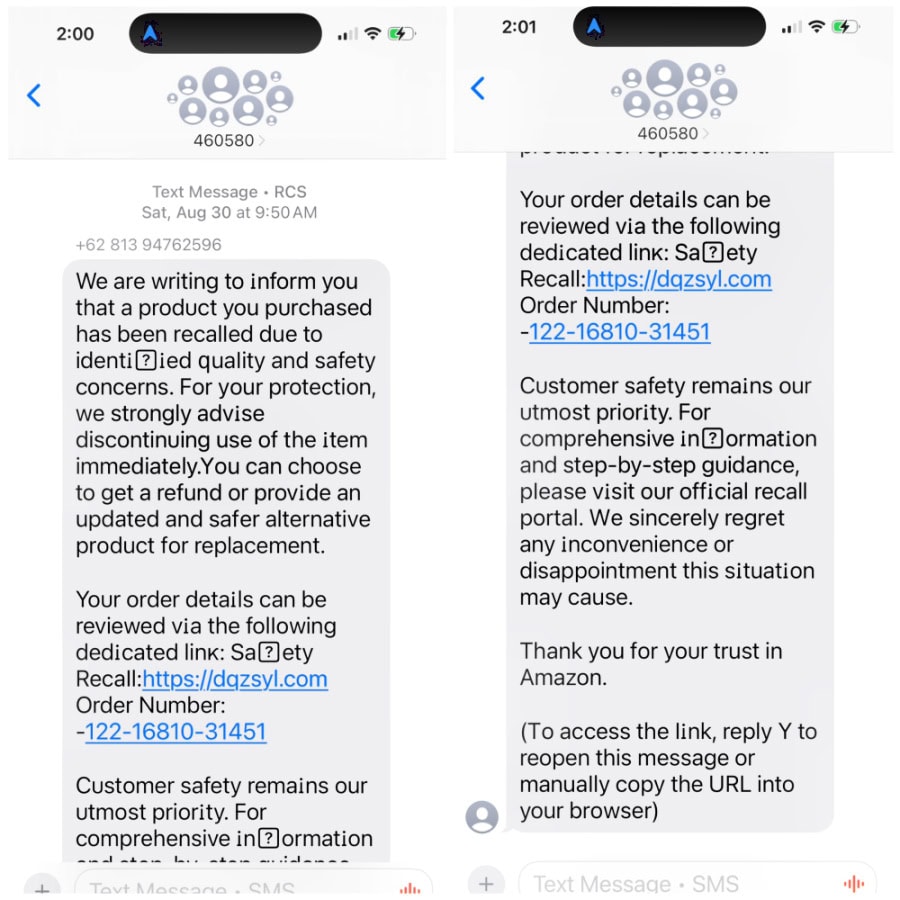
Here’s an example of a scam text I receive regularly. You can see that it went out to a large group of people’s phone numbers. If you click this link, you are opening your phone to the scammers who can steal your information. Don’t even be tempted to text back…just delete and label junk. And no, Amazon will never text you about a recall, but I’ve gotten several texts that claim just that.
Email Scam
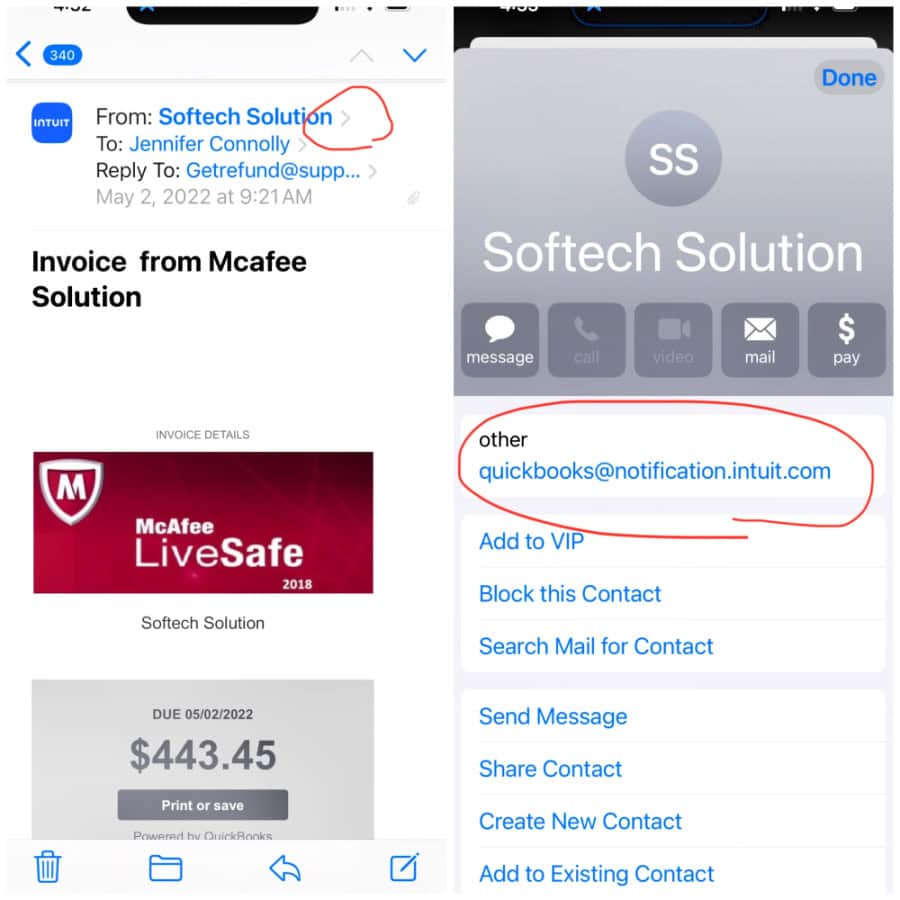
Here’s a common type of email scam I get regularly. No, I did not order anything from this company, so I was immediately suspicious. When you check the sending email, you see a nonsensical email that is not associated with Intuit.
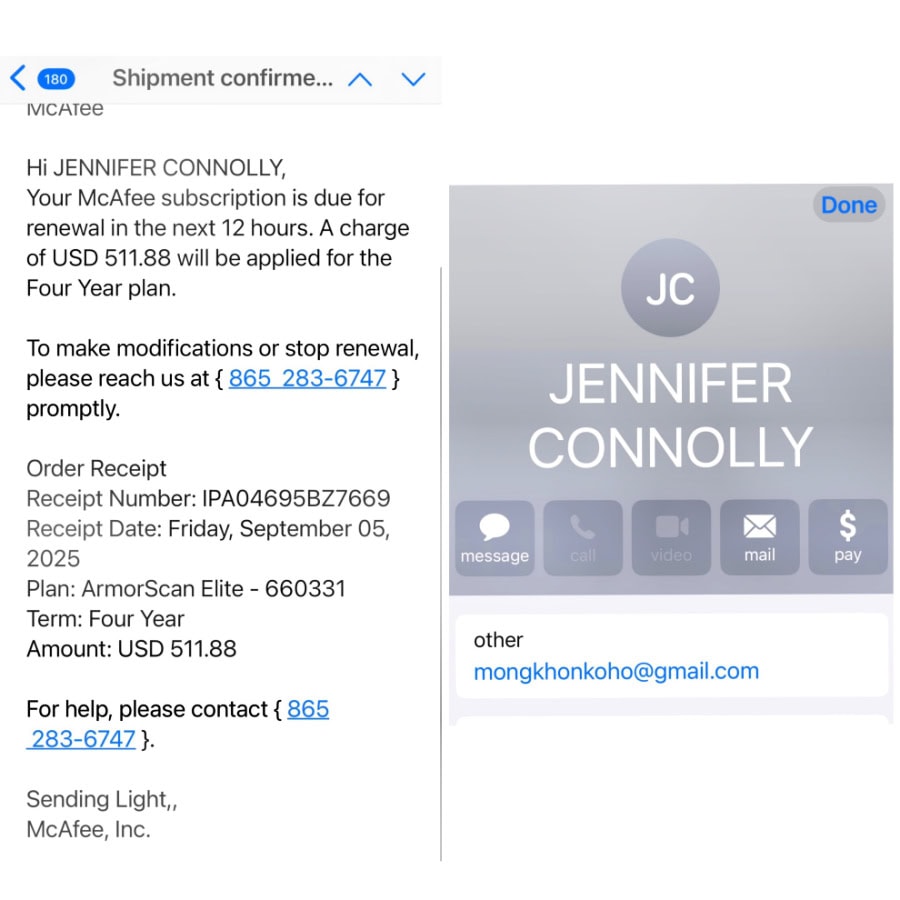
Here is another McAfee scam email…notice the email sender. The email said the email came from me to me. When I clicked on the sender’s email, I saw this [email protected]. A clear scam.
An Apple Email Scam
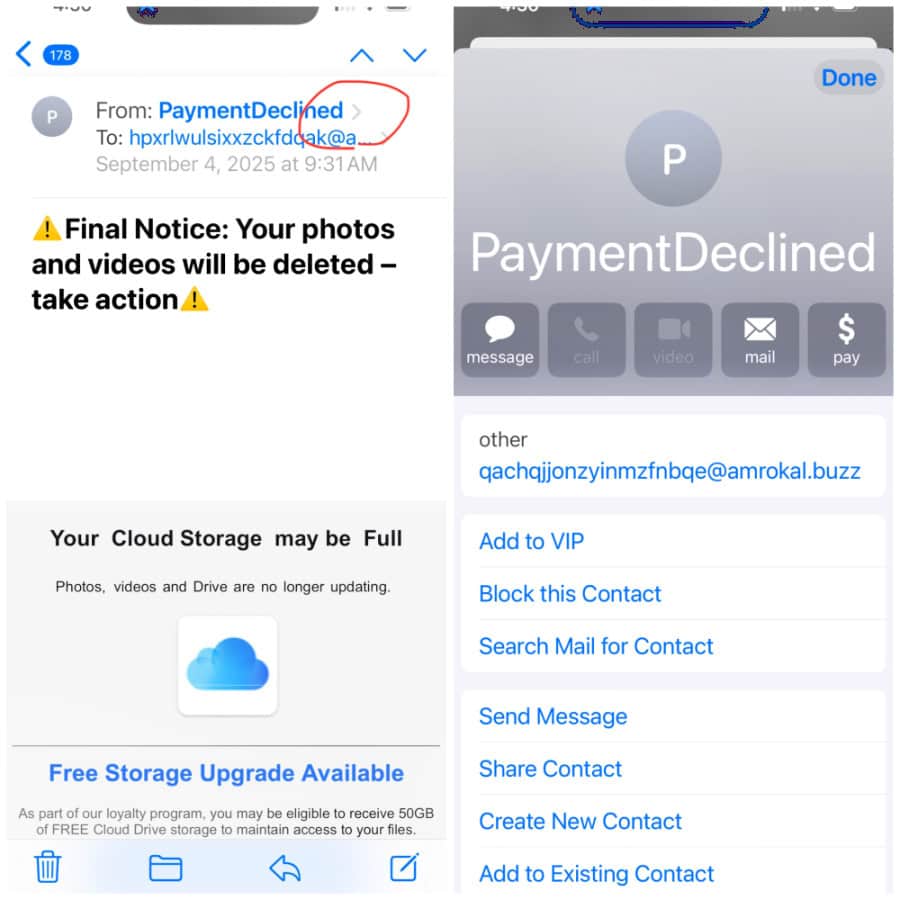
Another email scam claims that my iCloud storage is full and that I will lose my photos and videos. When you click the “Payment Declined” sender at the top of the email, it shows the sender’s email, which is not iCloud. Delete and label spam.
Some simple rules I live by:
- Never click on links in suspicious emails or texts.
- Use two-factor authentication when I can.
- Don’t recycle the same password for everything.
- These sound obvious, but in the moment, it’s easy to forget.
A Family Code Word
This is one of the simplest but smartest things you can do. Pick a word or phrase only your family knows and use it if something feels off.
Imagine you get a phone call from someone claiming to be your grandchild, panicked and needing money right away. AI can now copy people’s voices perfectly, so you can’t tell it’s not your loved one. Scammers prey on that instant emotional reaction. Instead of rushing, you can ask for the code word. If they can’t give it, you hang up.
I also like the idea of using it in everyday situations. If I’m out somewhere and something feels uncomfortable, I could text the word to my husband or my daughter. They would know it means I need help without me having to explain anything.
It takes all of five minutes to set up, but it could save a lot of heartache.
Keep Important Papers Accessible
I’ve learned through the years how impossible it is to make quick decisions without access to documents. Insurance information, medical cards, and powers of attorney. It all matters when time is short.
Now I keep a folder in a safe place with copies of things my family might need: IDs, prescriptions, medical information, and even bank contacts. A fireproof safe or fireproof folders are ideal, but I also tell my husband exactly where it is. There is no sense in organizing if no one else knows how to find it.
Share Health Information
I have a list of my medications and allergies with me in my purse, and my daughter has a copy as well. Phones now let you set up an emergency medical ID that first responders can access even if your phone is locked. It takes a few minutes to fill out, and it could make a difference if you are unable to speak for yourself.
Click here for directions on how to set up the emergency medical ID on an Iphone if you have one.
If you take several prescriptions or see multiple doctors, give someone you trust a list. When stress is high, small details are easily forgotten.
Talk About Financial Safety
Financial scams target older adults, like us, constantly. Teaching your loved ones to slow down and double-check before sending money is critical.
My husband and I agreed that we will never move money, send gift cards, or share account details based on a call, text, or email. If we are ever unsure, we call the company back on a number we know is real.
Passwords and Technology
Everything requires a password, and I don’t want my loved ones locked out if something happens to me. At a minimum, your spouse or adult child should know how to get into your phone, email, and bank accounts if necessary.
I keep a written list in a safe place along with instructions for my phone and email. Password managers are great if you are comfortable with them, but even an old-fashioned list is better than leaving people in the dark.
If you’re looking for a book to keep all of your passwords in one place, you may want to try this one for under $20!
An Emergency Call List
When something happens, time is everything. Create a simple contact tree that lists who should be called first, second, and third. For example, if you are unwell and cannot call for help yourself, your spouse may call one child, who then calls siblings and extended family.
This keeps communication clear and avoids confusion. You don’t want important information to get lost or for family members to hear different versions of the same story.
Have a Plan for Natural Disasters
Depending on where you live, this could mean hurricanes, wildfires, tornadoes, or earthquakes. Talk with your family about what to do if you need to evacuate or shelter in place.
Keep an emergency bag with basics like water, nonperishable food, medications, flashlights, and a phone charger. Know where you will go if you cannot stay in your home. Even if you never need it, having a plan will help everyone feel more secure.
A Few Final Thoughts
Preparing for scams, emergencies, and the unexpected isn’t exactly cocktail-party conversation, but ignoring it doesn’t make it go away. I’d much rather spend my time thinking about shoes or lipstick shades, but the truth is, having a plan keeps me calmer.
These little safeguards don’t take long, and they could spare my family from a whole lot of chaos one day. I’d rather roll my eyes at yet another scam text than scramble in a crisis. What about you…are you already set up, or is this one of those “I’ll get around to it” things on your list?
My daughter is in charge of my will. I have a secret binder with everything she will need when I expire. Every time I get new information I think will help her I file it in a folder then transfer to the binder 2x a year. Only she knows where the binder is.
I feel she will find everything when my time is up. I am only 71 so a lot more years of keeping that binder up to date.
Thanks for all your tips and reminders! Very useful !
You’ll have fun checking them out
Jennifer, this is such an excellent post. I’m just back from vacation and catching up! I love the family code word idea and I have also received the type of scam emails you are showing and then some. I also was almost scammed out of money from a phone call posing as one of my credit card banks. The caller had all my information and I mean ALL of it! Very scary!
Going along with the list of emergency contacts, medical etc. I would add a “ready bag” for an unexpected hospital stay. One week before we were due to leave on vacation, I found myself in the ER. To make a long story short, I unexpectedly had to stay over for 2 nights. My poor husband, who drove me to the ER, had to go home and bring things back that I needed. My needed items were all over the house, so I actually had to text him the list (so he would have it in writing rather than trying to remember)and the location of everything to gather for me! I realized that having a bag packed with a few key items would have really helped. I’m going to do this for both of us. Mine will contain, light lounge wear such as a t-shirt and drawstring pants to wear as pajamas, a sweater or sweatshirt because it’s usually freezing in the hospital, toothbrush & toothpaste, eye make-up remover, cotton balls, hair remover, deodorant, brush/comb, phone charger and possibly a change of clothes/underwear to come home in. A spouse or child could grab this in a pinch. Hope it doesn’t happen again, but being prepared brings peace of mind as you say. My son who is in his 30’s also had a hospital emergency this summer, and a friend of his had to go to his apartment and hunt for things he needed. A pre-packed bag would have helped him too! Anyway, thanks for a wonderful post.
That’s a brilliant idea. I need to have a bag ready to go too.
My go-to is my book styled annual calendar to list webpage, username, password including purpose and if it’s a subscription. For the first two weeks of the year I revisit it to change or
delete my links. My purpose each year is shorten the list.
Great advice! Golly, it seems like every day scammers come up with more ways to get at us.
The scam about tax abatements is driving me crazy and they call my cell phone. I have been doing block and report junk then deleting the call. I have an iPad and iPhone. The texts I have deleted. I want to block all calls except on my contacts list but can’t seem to be able to get to it since all of the updates. Emails, I delete. I am going to start the family code word. We have a huge family, blended and in different states so many of your ideas and many comments will help us. Thank you so much all!
Thank you for this list and information. The older I get the more I need this information. I am currently learning how to block callers from strange numbers on my phone. I have been inundated with spam calls. Blocking has been so helpful!
This is such good advice Jennifer – I so appreciate it!
Well done Jennifer. don’t forget to include pets in the planning process.
Thank you for sharing your valuable information! You not only help us to look our best but to live our best life!Lucy
Jennifer, many thanks for this valuable information. However, I must add, the photo that accompanies this email of you in the red sweater with a “red lippy” is amazing and I think it truly shows the “real you,” an incredible, powerful, fascinating woman, coming through! ❤️
Wow, that’s so kind, thanks!